
How to automate Meta leads into your CRM and send quality signals back

The short answer
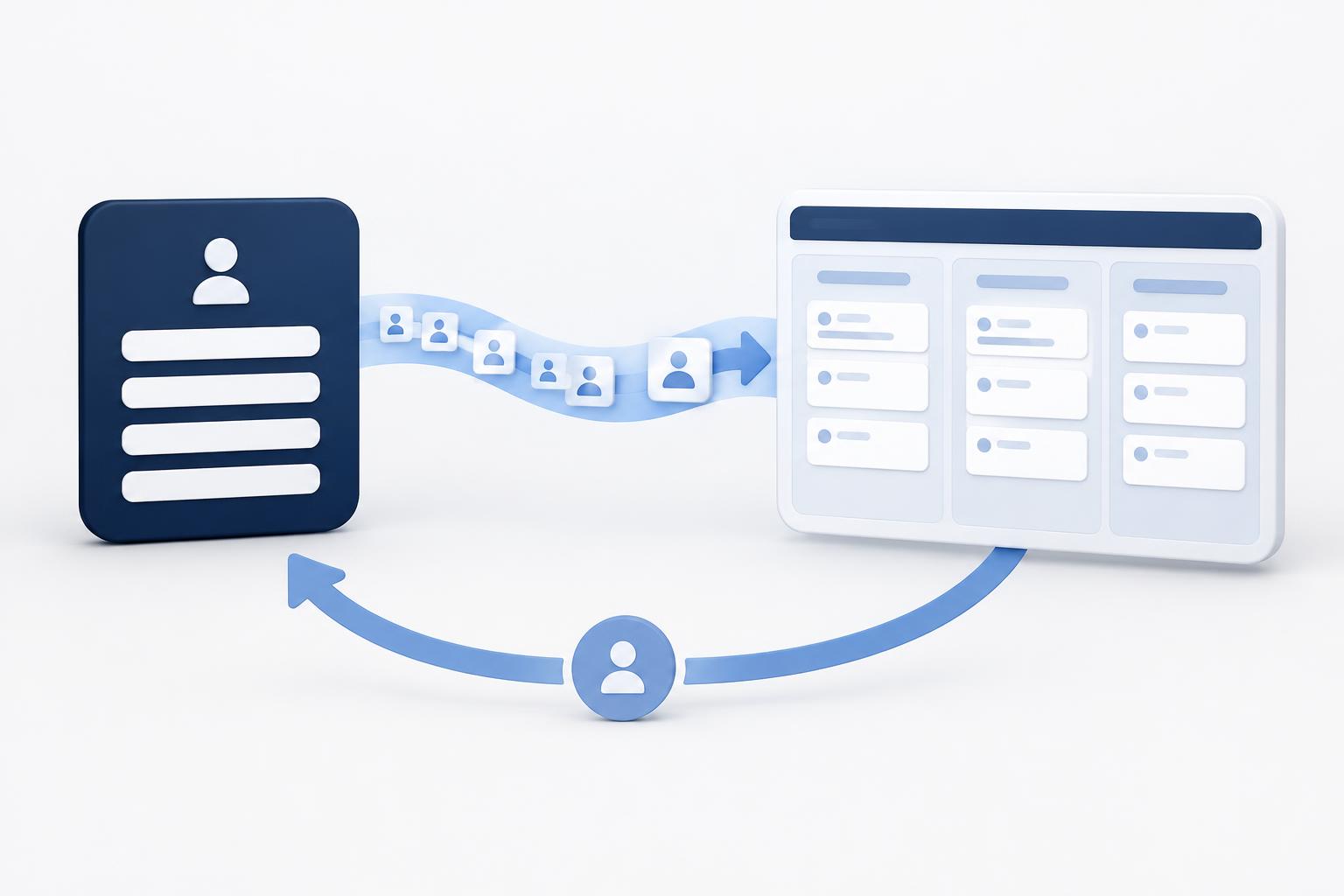
There are several ways to pull Instant Form leads into your CRM, store the Meta lead ID on every record, and send stage changes back through the Conversions API for CRM so Meta optimizes for quality instead of volume. This article covers the main methods. Messaging leads from Messenger, Instagram and WhatsApp require a separate Business Messaging setup.
Contents
- Why does lead quality drop without a feedback loop?
- How do you pull Instant Form leads into a CRM?
- How do you send quality signals back to Meta?
- How do you handle leads from conversations and messaging?
- Which tools make the integration practical?
- What should you check before going live?
- FAQ
- What to do next
Most accounts optimize only for form submissions. Meta then finds more people who fill forms, not more people who become customers. Closing the loop changes that.
Why does lead quality drop without a feedback loop?
Meta sees a form submit and treats it as a success. It does not know whether the lead was contacted, qualified, or turned into revenue.
When you send stage data back, Meta can shift delivery toward people more likely to reach the stages you care about. Meta has reported that Instant Form campaigns using the Conversions API for CRM with the qualified leads goal saw about 21% lower cost per quality lead on average compared with campaigns optimized only for volume. Results vary by account.
What this means for your decision: Treat the feedback loop as part of the campaign setup, not a later improvement.
How do you pull Instant Form leads into a CRM?
- Create or use an Instant Form in Ads Manager.
- Connect the form to your CRM through a native integration, Zapier, Make, or a dedicated connector such as LeadsBridge.
- Map fields and, critically, store the Meta lead ID (a 15-17 digit number) as a custom field.
- Trigger an immediate follow-up (email, SMS, or task) so response time stays low.
Common options:
- Native CRM integrations (HubSpot, Salesforce Lead Capture, and others) for real-time sync.
- Zapier or Make when you need routing logic, extra steps, or a CRM without a strong native connector.
Store the lead ID on every record. Without it, matching quality signals back later becomes weaker or impossible.
What this means for your decision: Choose the integration method that reliably captures the lead ID and reaches your team within minutes.
How do you send quality signals back to Meta?
Use the Conversions API for CRM (separate from the website Conversions API).
Requirements Meta lists:
- At least ~200 leads per month.
- Daily uploads.
- The stage you optimize for occurs within 28 days.
- That stage is reached by roughly 1% to 40% of leads.
- Prefer matching with the Meta lead ID; email or phone can be used as weaker alternatives.
Steps:
- Create a CRM dataset (or use an existing one) in Events Manager.
- Connect your CRM or middleware so stage changes (e.g., "Qualified", "Booked", "Won") are sent as events.
- Include the lead ID, event time, and stage name.
- In Ads Manager, switch the performance goal to maximize qualified leads once volume and matching are healthy.
You can send multiple stages per lead. Meta uses the deeper, consistent stages for optimization.
What this means for your decision: Define clear, consistent stages your team applies the same way every time before turning on the feedback loop.
How do you handle leads from conversations and messaging?
Click-to-Messenger, Click-to-Instagram, and Click-to-WhatsApp leads do not use the same Instant Form pipeline.
For WhatsApp, Messenger, and Instagram messaging:
- Use the Conversions API for Business Messaging.
- Capture the relevant click ID (for example, the Click-to-WhatsApp click ID).
- Send events such as LeadSubmitted or Purchase from the conversation platform or CRM.
- Many Business Solution Providers and tools such as Gorgias or dedicated WhatsApp CRM platforms handle the technical side and CRM sync.
Native WhatsApp Business app conversations are limited. Serious volume usually requires the WhatsApp Business API through a provider.
What this means for your decision: Treat messaging leads as a separate integration path. Do not assume Instant Form tools cover them.
Which tools make the integration practical?
- Zapier / Make - Flexible for form-to-CRM and for sending stage events back. Good when you need custom logic.
- Native CRM connectors - Fastest for HubSpot, Salesforce, and similar platforms.
- LeadsBridge and similar - Built for Meta lead sync and feedback.
- WhatsApp BSPs / conversation platforms - Handle messaging leads and can push events to Meta.
Start with the path that captures the lead ID reliably. Add the return signal once stages are consistent.
What should you check before going live?
- Every new lead creates a CRM record with the Meta lead ID.
- Follow-up happens within minutes during business hours.
- Stage definitions are clear and applied consistently.
- Events are uploading daily and match rates are healthy in Events Manager.
- You meet Meta’s volume thresholds before switching the performance goal.
Small gaps in matching or inconsistent stages weaken the signal Meta receives.
Frequently asked questions.
No. You can run volume-optimized lead ads without it. You need it to optimize for quality using the qualified leads goal on new campaigns.
Start with form-to-CRM automation and consistent stages. Switch the optimization goal once volume is high enough for Meta to learn.
Website forms use the regular Conversions API. Instant Forms use the CRM-specific version. They are separate integrations.
Yes, but through the Business Messaging Conversions API and a proper WhatsApp Business API connection, not the Instant Form path.
What to do next
Want a clear recommendation based on your actual channels and spend?
Talk to our team.
Talk to our teamRelated Articles
 Social
How to promote your LinkedIn effectively
November 13, 2026
Grow your LinkedIn presence through personal profiles, company pages, document carousels and a simple B2B funnel, with practical outreach limits and tool recommendations.
Read More Ecommerce
Which Shopify apps actually matter for high-volume stores?
November 13, 2026
The focused Shopify stack high-volume stores actually run: email, reviews, support, attribution, subscriptions, returns, and the AI tools worth adding.
Read More ASO
Top ASO Tools in 2026, Broken Down by What They Actually Do Well
April 28, 2026
In today's competitive app market, succeeding in the App Store and Google Play demands more than basic keyword stuffing.
Read More